Introduction
Plant Pal is a machine learning project that helps gardeners and plant enthusiasts identify the health status of plants from images.
The project is more than just training a model—it’s a complete MLOps workflow demonstrating:
- End-to-end pipeline orchestration
- Experiment tracking and model versioning
- Deployment of a web app for real-time predictions
Technologies Used: Python, TensorFlow/Keras, ZenML, MLflow, Streamlit
Motivation: Showcase a production-ready ML workflow and MLOps skills relevant to Cloud/MLOps roles.
Architecture Overview
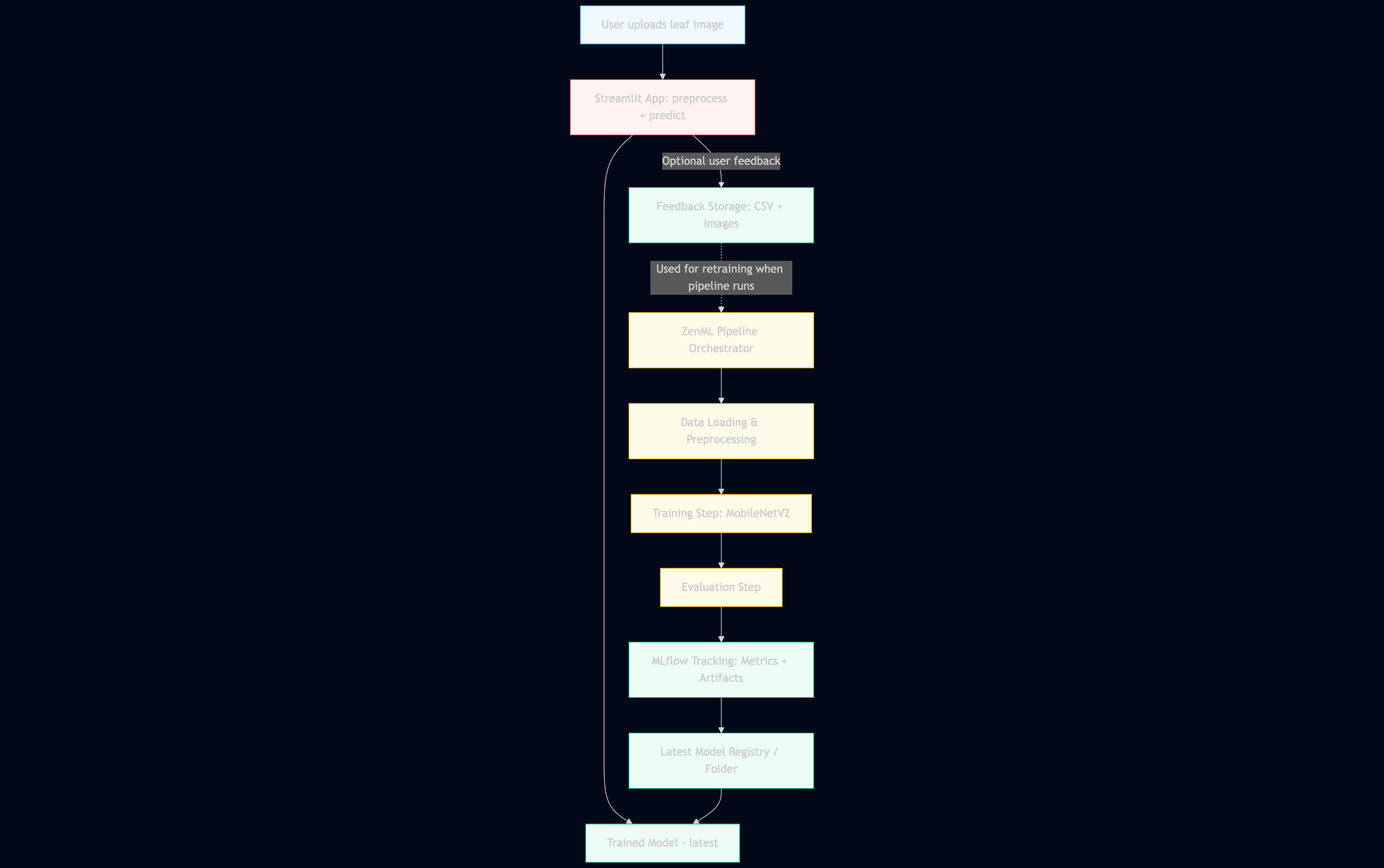
Key Components:
- Frontend: Streamlit web app for uploading images and viewing predictions.
- Backend: Deep learning model trained via ZenML pipelines.
- Experiment Tracking: MLflow tracks metrics, models, and artifacts.
- Data Flow: Images → preprocessing → training → evaluation → model storage → deployment → prediction.
This setup demonstrates a production-style ML workflow where pipelines, versioning, and deployments are automated and reproducible.
Implementation Steps
1. Data Loading & Preprocessing
Images are loaded from a local dataset, split into training and validation sets, and preprocessed using ZenML pipelines for consistency.
from tensorflow.keras.preprocessing.image import ImageDataGenerator

datagen = ImageDataGenerator(validation_split=0.2, rescale=1./255)
train_data = datagen.flow_from_directory('dataset/', subset='training', target_size=(224,224))
val_data = datagen.flow_from_directory('dataset/', subset='validation', target_size=(224,224))
ZenML handles batching and step dependencies to ensure reproducibility.
2. Model Training
We used MobileNetV2 with transfer learning for fast, reliable training on a small dataset.
base_model = MobileNetV2(
    include_top=False,
    input_shape=(224, 224, 3),
    weights="imagenet"
)
base_model.trainable = False

x = GlobalAveragePooling2D()(base_model.output)
output = Dense(1, activation="sigmoid")(x)
model = Model(inputs=base_model.input, outputs=output)

model.compile(
    optimizer=Adam(1e-4),
    loss="binary_crossentropy",
    metrics=["accuracy"]
)

model.fit(X_train, y_train, epochs=3, validation_data=(X_val, y_val))

model.save("models/latest_model/plant_pal_model.keras")
Artifacts are logged to MLflow for experiment reproducibility.
3. Model Evaluation
import mlflow
from tensorflow.keras.models import load_model

mlflow.set_tracking_uri("http://127.0.0.1:5000")
mlflow.tensorflow.autolog()

model = load_model("models/latest_model/plant_pal_model.keras")
loss, accuracy = model.evaluate(val_data)
print(f"Validation Accuracy: {accuracy}")
MLflow visualizes metrics and compares multiple runs, demonstrating strong MLOps practice.
4. Deployment with Streamlit
Users can upload plant images and receive predictions in real time:
# Load model once
model = tf.keras.models.load_model("models/latest_model/plant_pal_model.keras")

def preprocess(image):
    image = image.convert("RGB").resize((224, 224))
    arr = np.array(image) / 255.0
    return np.expand_dims(arr, 0)

uploaded = st.file_uploader("Upload an image", type=["jpg", "png"])

if uploaded:
    image = Image.open(uploaded)
    x = preprocess(image)
    pred = model.predict(x)[0][0]

    label = "Unhealthy" if pred >= 0.5 else "Healthy"
    st.write(f"**Prediction:** {label} (confidence: {pred:.2f})")
    st.image(image, caption="Uploaded image")
5. Running the Project Locally
Clone the repo and activate the environment:
git clone https://github.com/helipatel11/plant-pal-mlops.git
cd Plant-Pal
python -m venv .venv
source .venv/bin/activate
pip install -r requirements.txt
Run ZenML pipeline:
python -m src.run_pipeline
Launch Streamlit App:
streamlit run src/app/streamlit_app.py
View MLflow UI:
mlflow ui
# Open http://127.0.0.1:5000
Challenges & How I Overcame Them
- Small Dataset: Used transfer learning (MobileNetV2) to reduce overfitting.
- Pipeline Management: Learned ZenML step orchestration for reproducibility.
- Experiment Tracking: MLflow ensured versioning and reproducibility.
- Deployment: Streamlit allowed fast demonstration without heavy cloud setup.
Key Takeaways
- End-to-end MLOps workflow achievable with limited data.
- ZenML simplifies pipeline orchestration and reproducibility.
- MLflow enables experiment tracking and model versioning.
- Streamlit provides an interactive, user-friendly frontend.
Future Improvements
- Expand dataset for better generalization.
- Implement multi-class classification for plant diseases.
- Host Streamlit app and MLflow server in the cloud.
- Integrate GitHub Actions for automated pipeline execution and deployment.
Conclusion
Plant Pal demonstrates my ability to build end-to-end MLOps workflows, integrate multiple tools, and deploy a usable ML application.
It’s a strong portfolio project for Cloud/MLOps roles, showing technical depth, production mindset, and reproducibility.