Introduction
In this project, I built a production-ready cloud resume website using AWS S3, Route 53, Lambda, DynamoDB, Terraform, and GitHub Actions.
The goal wasn’t just to deploy a static website—it was to tackle real-world cloud challenges, including IAM permission errors, API Gateway CORS issues, Terraform quirks, and automated CI/CD deployments.
This blog is a step-by-step technical walkthrough, highlighting the architecture, the challenges I faced, and the lessons I learned along the way.
Check out the live site here.
Architecture Overview
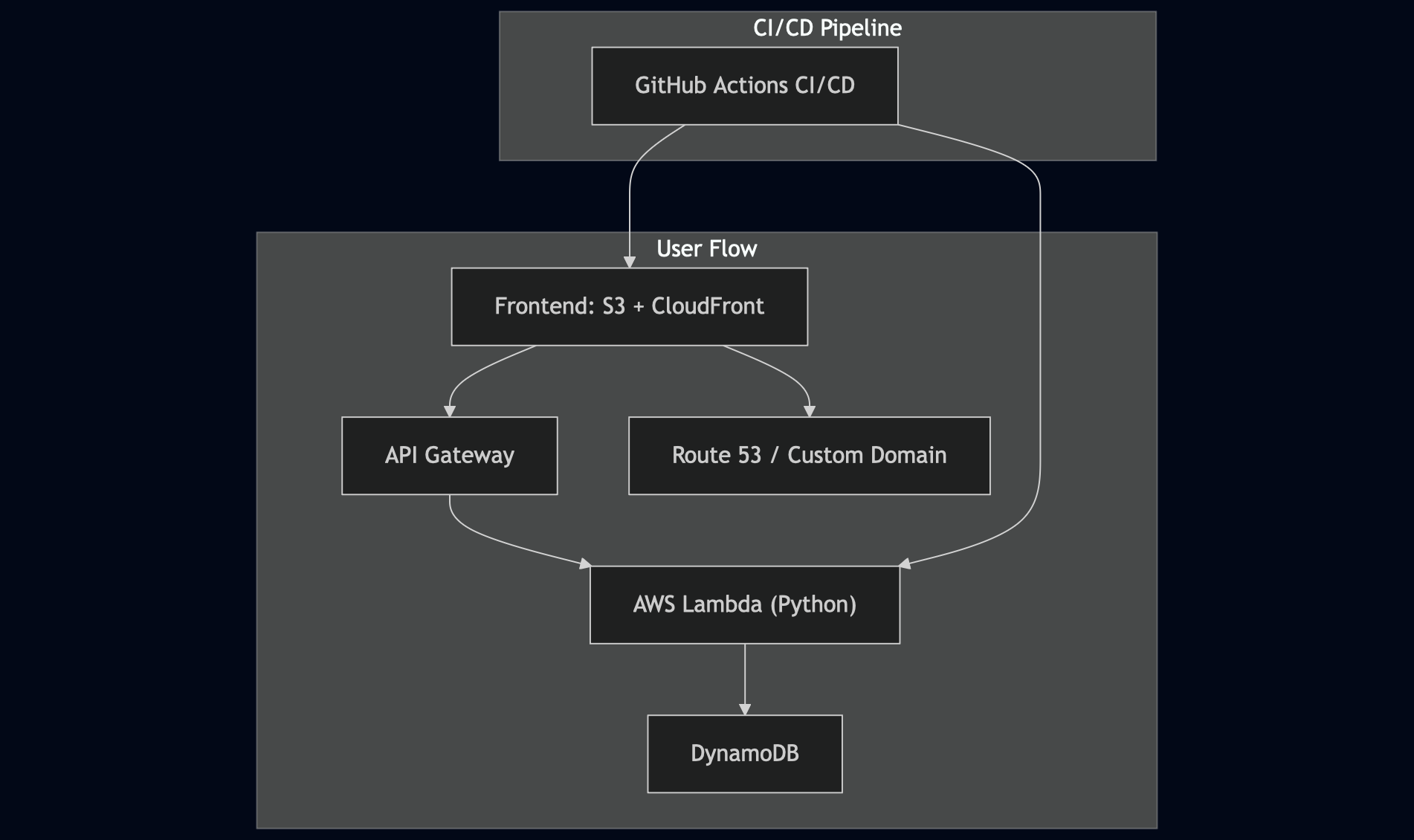
- Frontend: Static website hosted on S3 and delivered via CloudFront for CDN and HTTPS support.
- Backend: AWS Lambda functions written in Python, exposed through API Gateway, reading/writing to DynamoDB.
- CI/CD: GitHub Actions automatically deploys changes to both frontend and backend.
- Domain: Route 53 manages the custom domain, with DNS configured for CloudFront.
Step-by-Step Implementation
1. Hosting the Frontend on S3
Setting up S3 for static website hosting was straightforward, but ensuring proper security and public access required careful IAM configuration.
Snippet placeholder:
{
  "Version": "2008-10-17",
  "Id": "PolicyForCloudFrontPrivateContent",
  "Statement": [
    {
      "Sid": "AllowCloudFrontServicePrincipal",
      "Effect": "Allow",
      "Principal": {
        "Service": "cloudfront.amazonaws.com"
      },
      "Action": "s3:GetObject",
      "Resource": "arn:aws:s3:::<BUCKET_NAME>/*",  // Replace with your S3 bucket
      "Condition": {
        "StringEquals": {
          "AWS:SourceArn": "arn:aws:cloudfront::<ACCOUNT_ID>:distribution/<DISTRIBUTION_ID>"
          // Replace with your CloudFront distribution ARN
        }
      }
    }
  ]
}
Route 53 integration for the custom domain involved careful DNS propagation handling and CloudFront distribution setup.
2. API Gateway + Lambda for Visitor Counter
The Lambda function handles visitor counting and updates DynamoDB. Initial integration caused multiple issues:
- CORS errors
- 403 Forbidden responses
- Misconfigured IAM roles
After debugging, I implemented a minimal privilege IAM policy to secure the Lambda function.
Snippet placeholder:
import json
import boto3

# Connect to DynamoDB (credentials handled via IAM role)
dynamodb = boto3.resource('dynamodb')
table = dynamodb.Table("<DYNAMODB_TABLE_NAME>")  # Replace with your table name

def lambda_handler(event, context):
    """
    Lambda function to increment and return visitor count.
    Safe for public sharing: no sensitive credentials included.
    """
    # Fetch current visitor count
    response = table.get_item(Key={'id': '0'})
    views = response['Item']['views']

    # Increment count
    views += 1
    print(f"Visitor count: {views}")

    # Update count in DynamoDB
    table.put_item(Item={'id': '0', 'views': views})

    return views
3. DynamoDB Setup
DynamoDB served as the persistent store for visitor counts. Challenges included:
- Assigning correct IAM permissions
- Preventing duplicate writes
- Ensuring accurate data persistence
Snippet placeholder:
resource "aws_dynamodb_table" "visitor_count" {
  name         = "visitor-counter"  # Example name
  billing_mode = "PAY_PER_REQUEST"
  hash_key     = "id"

  attribute {
    name = "id"
    type = "S"
  }
}
4. Infrastructure as Code with Terraform
Terraform was used to provision S3, CloudFront, Lambda, DynamoDB, and IAM resources.
Key lessons:
- Modular Terraform structure is critical
- Remote state with S3 + DynamoDB locking prevents state corruption
- Debugging conflicts between resources requires careful planning
Snippet placeholder:
resource "aws_iam_role" "lambda_exec" {
  name = "lambda-exec-role"

  assume_role_policy = jsonencode({
    Version = "2012-10-17",
    Statement = [
      {
        Action = "sts:AssumeRole",
        Effect = "Allow",
        Principal = { Service = "lambda.amazonaws.com" }
      }
    ]
  })
}

resource "aws_iam_role_policy_attachment" "lambda_dynamodb" {
  role       = aws_iam_role.lambda_exec.name
  policy_arn = "arn:aws:iam::aws:policy/AmazonDynamoDBFullAccess"
}
5. CI/CD with GitHub Actions
Automated deployment of both frontend and backend via GitHub Actions. Challenges included:
- Secure AWS credential management
- Debugging pipeline failures
- Handling sequential deployments of backend before frontend
Snippet placeholder:
name: Update S3 Bucket with OIDC

on:
  push:
    branches:
      - main  # Trigger on push to the main branch (adjust as needed)

permissions:
  id-token: write
  contents: read

jobs:
  update_s3:
    runs-on: ubuntu-latest
    steps:
      - name: Checkout repository
        uses: actions/checkout@v3

      - name: Configure AWS OIDC credentials
        uses: aws-actions/configure-aws-credentials@v3
        with:
          role-to-assume: ${{ secrets.AWS_ROLE_TO_ASSUME }}  # Placeholder for IAM Role ARN
          aws-region: <AWS_REGION>  # Replace with your AWS region

      - name: Upload file to S3
        run: |
          aws s3 cp ./Website s3://${{ secrets.AWS_S3_BUCKET_NAME }}/ --recursive
          # Bucket name is stored as a GitHub secret, never hardcode it
Challenges and Solutions
IAM Role Debugging
Lambda initially failed due to missing dynamodb:UpdateItem. CloudWatch logs helped identify the silent failure. Implemented minimal-privilege policy iteratively.
CORS Issues in API Gateway
Had to explicitly add Access-Control-Allow-Origin headers and test with Postman for real-time debugging.
Terraform Errors Resource conflicts arose when modules weren’t structured cleanly. Learned to separate modules and manage remote state locking.
DNS Configuration with Route 53 Patience required for propagation. Ensured proper configuration for CloudFront distribution to respect HTTPS.
GitHub Actions Authentication Failures Initially, pipelines failed due to misconfigured secrets. Added AWS credentials securely and validated workflow locally before pushing.
Key Takeaways
- Real-world cloud projects are rarely linear. Debugging is a major part of the work.
- IAM permissions are tricky. Least privilege policies reduce risk but require careful testing.
- Terraform modules + remote state = stability. Modular infrastructure improves maintainability.
- CI/CD pipelines save time. Automation is essential, but pipelines must be validated thoroughly.
- Logging is everything. CloudWatch, Terraform plan output, and CI/CD logs are critical for debugging.
Final Thoughts
The Cloud Resume Challenge was not just an exercise in deployment; it was a hands-on deep dive into AWS, Terraform, CI/CD, and serverless architecture. I now have real-world experience building, securing, and automating cloud infrastructure end-to-end—skills directly relevant to MLOps and cloud engineering roles.
This project taught me how to debug, design, and deliver production-grade cloud systems. If you want to level up your cloud skills, I highly recommend tackling this challenge.